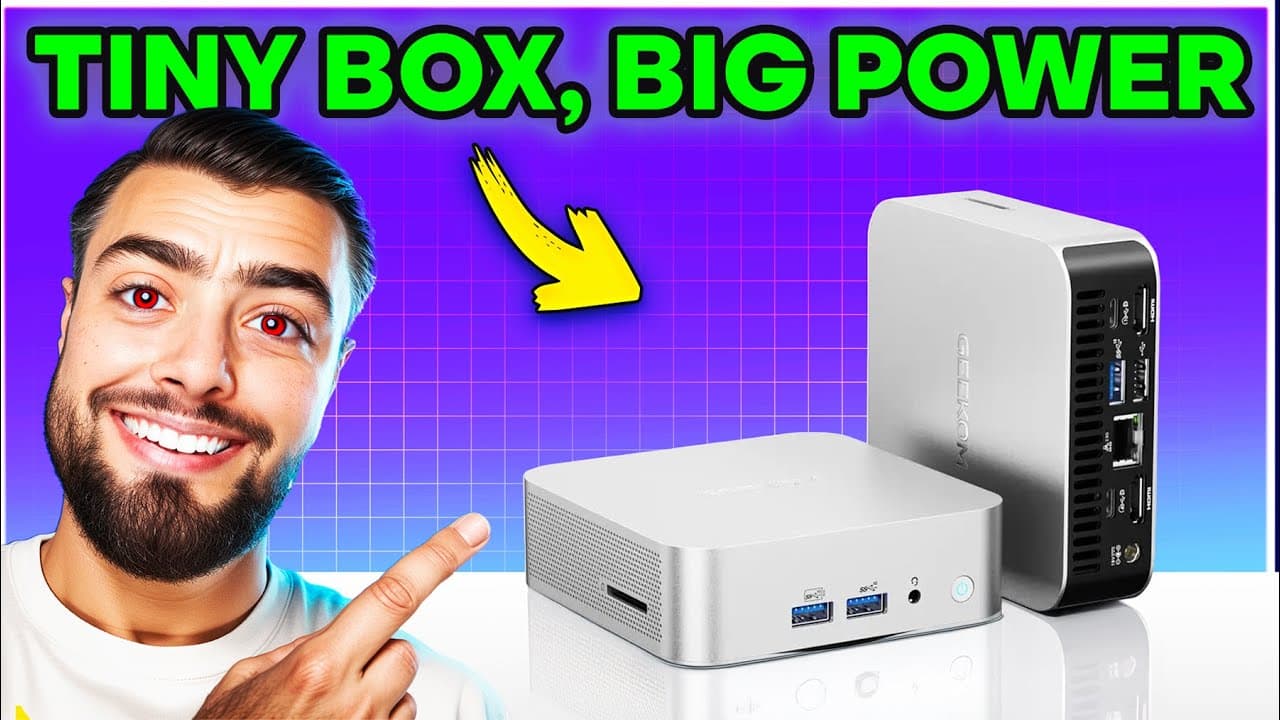
GEEKOM A6 Review: 4K Gaming on a Budget Mini PC
I tested the GEEKOM A6 mini PC with GTA 5 at 4K, ran Cinebench benchmarks, and checked the cooling. Here is what works and where it hits its limits.
Bekijk de video op YouTubeMade in collaboration with GEEKOM. They had no say in what I wrote, and the opinions are my own.
You do not need to spend 700 dollars to run Grand Theft Auto V at 4K on a palm-sized desktop. The GEEKOM A6 runs it at 50 to 60 frames per second using its integrated AMD Radeon 680M graphics, and it costs around 419 dollars. That alone makes it one of the most interesting budget machines on the market right now.
GEEKOM sent me this unit for free to test, but they had no say in this review, no script approval, and did not pay me to say nice things. When I checked pricing on November 3, 2025, the A6 was listed at $419 on the official GEEKOM US store and Amazon US, or £439 on the GEEKOM UK site and Amazon UK. I came in expecting a basic office cube. I walked away surprised.
Build quality, ports, and what comes in the box
Pulling the A6 out of the packaging, the first thing that hits you is the casing. Most cheap mini PCs come wrapped in flimsy, hollow plastic that bends when you pick them up. The A6 uses an all-aluminium unibody chassis with clean edges and zero panel creak. As I said in the video, "It's all aluminium, the entire chassis. Not plastic, real metal."
Inside the box, GEEKOM includes a standard HDMI cable, mounting screws, paperwork, a metal VESA mount to hang the machine behind your monitor, and the power brick. The power supply caught me off guard. "Oh whoa, this thing is chunky. Let me check: 120 watts. Yeah, that makes sense." That 120W external brick is large compared to the 4.4-inch chassis, but the hardware inside actually needs the juice under sustained load.
The port selection on this box puts many expensive desktop towers to shame. Up front, you get two USB-A 3.2 ports, a 3.5mm headphone and microphone jack, and the power button. On the left side, GEEKOM included a full-size SD card reader. For anyone editing video or dumping camera footage, not having to look for an external dongle saves real time.
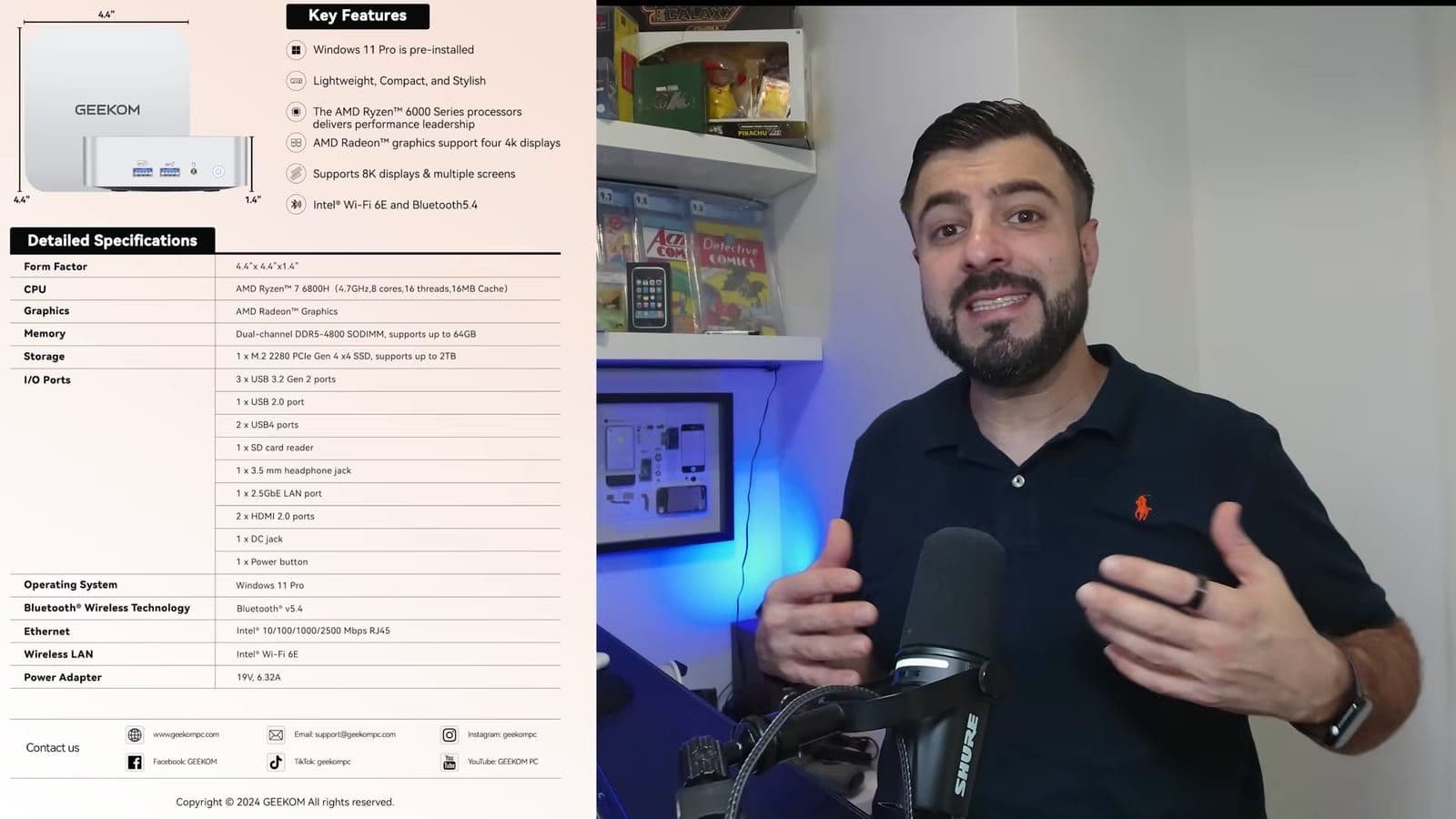
Around back, things get even better. You get two HDMI ports, two USB-C ports, a 2.5 Gbps Ethernet port, and two more USB-A ports. One of the rear Type-C ports is a full-rate 40 Gbps USB4 port. You can plug in high-speed external NVMe drives or even an eGPU. With the dual HDMI and dual USB-C ports combined, the A6 can drive up to four displays at the same time.
Opening the chassis to inspect the upgradable hardware
Many mini PCs follow the Apple route and solder everything directly to the logic board. Once you run out of memory or storage, your only option is buying a brand new computer. The A6 takes the opposite approach.
To open it, you pry off the four rubber feet on the bottom and remove the screws beneath them. Take your time lifting the base plate. There is a delicate Wi-Fi antenna wire attached to the bottom lid, and if you yank the plate too quickly, you will snap that wire. Once inside, you have clear access to every primary component.
"Boom, you've got access to everything: two RAM slots, 32 gigs installed, but you can go up to 64 gigabytes if you want." GEEKOM ships the machine with 32GB of dual-channel DDR5 running at 4800 MT/s across two SODIMM slots. Storage is handled by a 1TB Lexar PCIe Gen 4x4 M.2 NVMe SSD. Right alongside that primary drive sits an additional M.2 slot, meaning you can double your internal capacity down the road without cloning your operating system.
Underneath the aluminium hood, the A6 runs on the AMD Ryzen 7 6800H processor. That gives you 8 cores, 16 threads, and a boost clock reaching up to 4.7 GHz. The graphics are powered by the integrated AMD Radeon 680M. The 6800H is not the newest silicon on the shelf, since it originally debuted in 2022. But at this price tag, pairing an 8-core H-series chip with fast DDR5 and an open expansion path makes total sense.
Daily performance and synthetic benchmark results
Cold boot times on the pre-installed Windows 11 Pro sit between 12 and 15 seconds. Everyday desktop tasks feel instant. Heavy web browsing with dozens of open tabs, 4K media playback, and office productivity software never caused the system to hitch or slow down.
Synthetic testing backed up that real-world speed. In Cinebench R23, the Ryzen 7 6800H pulled a multi-core score of 11,572 points. That score beats several older desktop chips and handles multithreaded jobs like video rendering or large software compilations without stalling.
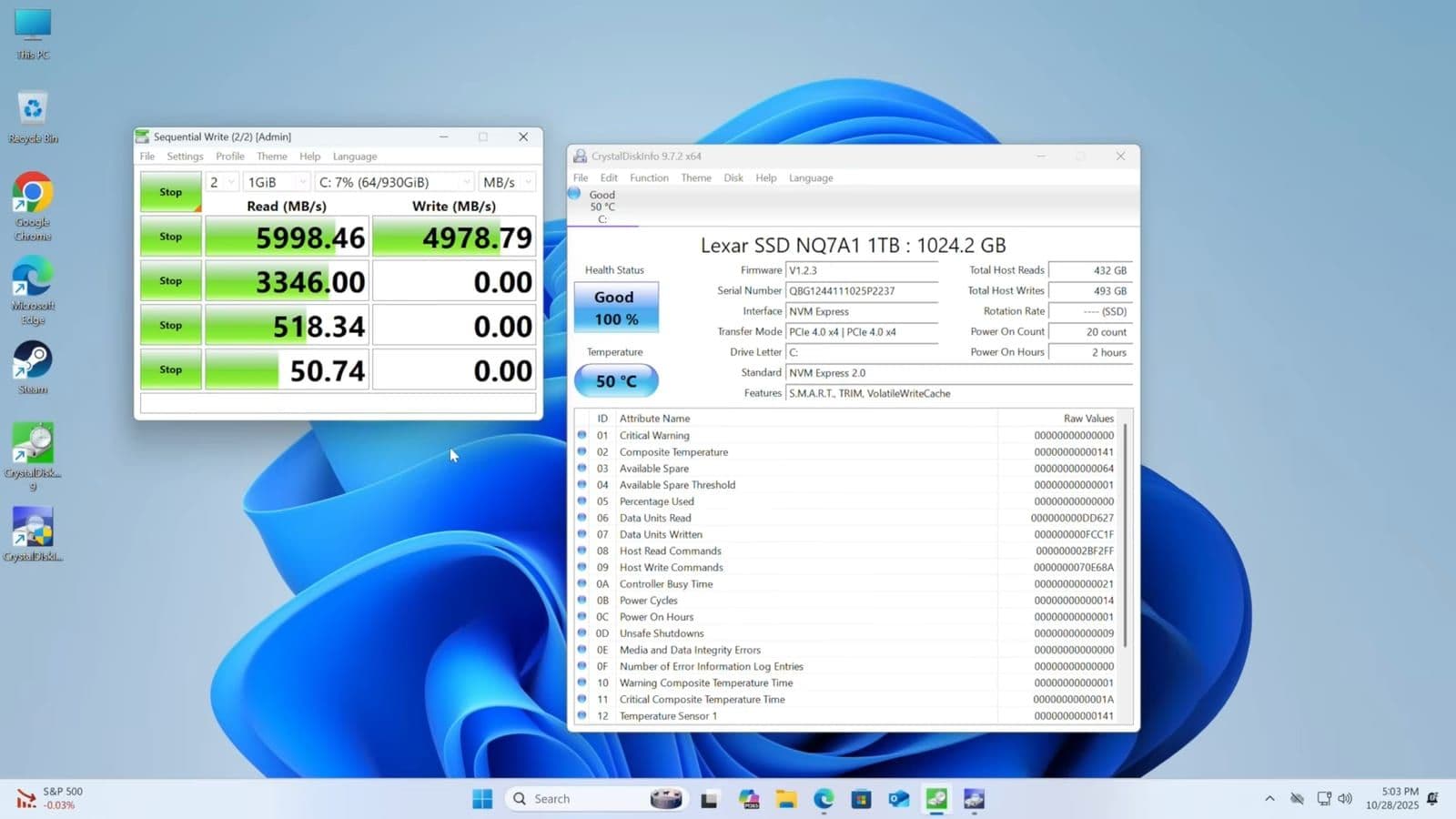
The 1TB Lexar PCIe Gen 4 SSD performed just as well in CrystalDiskMark. Sequential read speeds measured at 5,998 MB/s, while sequential write speeds came in at 4,978 MB/s. That drive speed is directly noticeable when installing games. Downloading and unpacking the 90GB GTA 5 installation over the 2.5G LAN port was remarkably fast, with zero drive bottlenecks.
Thermals were another area where I expected issues. Small boxes usually sound like jet engines when pushed. During the entire 10-minute Cinebench loop, the cooling fan remained quiet. The CPU core temperatures peaked around 80°C to 85°C, well below the throttling limit of AMD mobile hardware.
Gaming performance in Counter-Strike 2 and GTA 5
Integrated graphics used to mean 720p gaming at minimum settings. The Radeon 680M inside the A6 changes that equation entirely.
My first gaming run was Counter-Strike 2 at 1080p using medium to high graphical settings. In active firefights on competitive maps, the A6 held steady between 85 and 100 FPS. Frame pacing was smooth, the CPU stayed at 78°C, and the integrated GPU sat around 74°C with 70 percent load. For an esport title, it delivers a totally viable competitive experience.
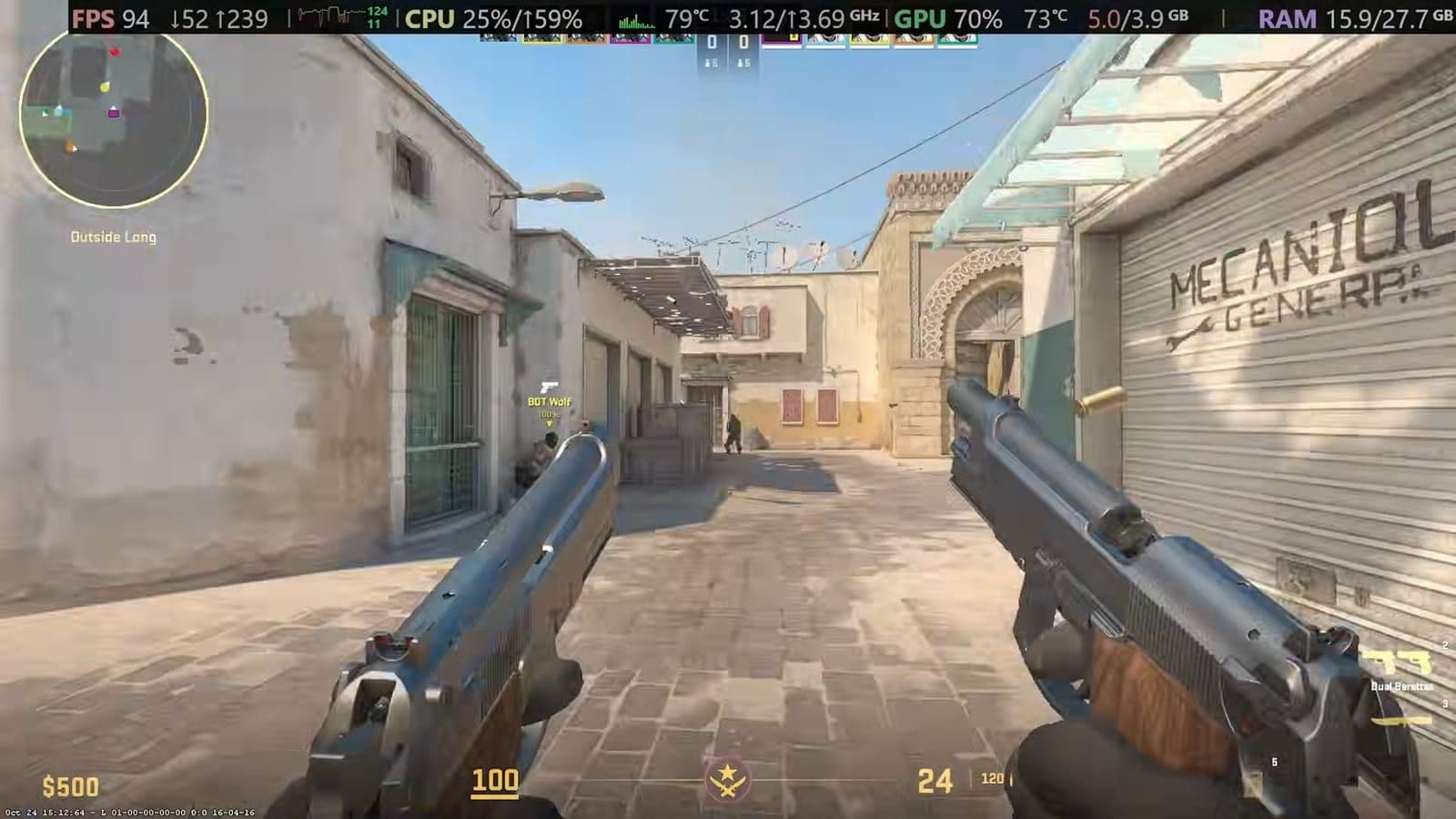
Then I pushed it with Grand Theft Auto V at full 4K resolution. I was not expecting much. Yet driving through Los Santos and shooting through heavy traffic, the game maintained 50 to 60 FPS. The GPU sat at 98 to 100 percent utilization the entire time, and temperatures leveled out around 82°C. There was no thermal throttling and no sudden frame drops.
"GTA 5, 60 FPS at 4K. Most mini PCs with these specs cost like $700. This one? About 418." You do have to be realistic about its limits, though. If you expect to play modern heavyweights like Cyberpunk 2077 on ultra settings with ray tracing, this box will not do it. Integrated Radeon graphics cannot replace a dedicated desktop GPU for brand-new blockbuster games. But for older AAA games, esports titles, and lighter indie titles, this little PC punches well above its size.
The BIOS tweaks that give you extra gaming performance
You can pull even more performance out of the A6 right out of the box with two small setting changes in the firmware. When you restart the PC, press the Delete key repeatedly to load into the Aptio BIOS interface.
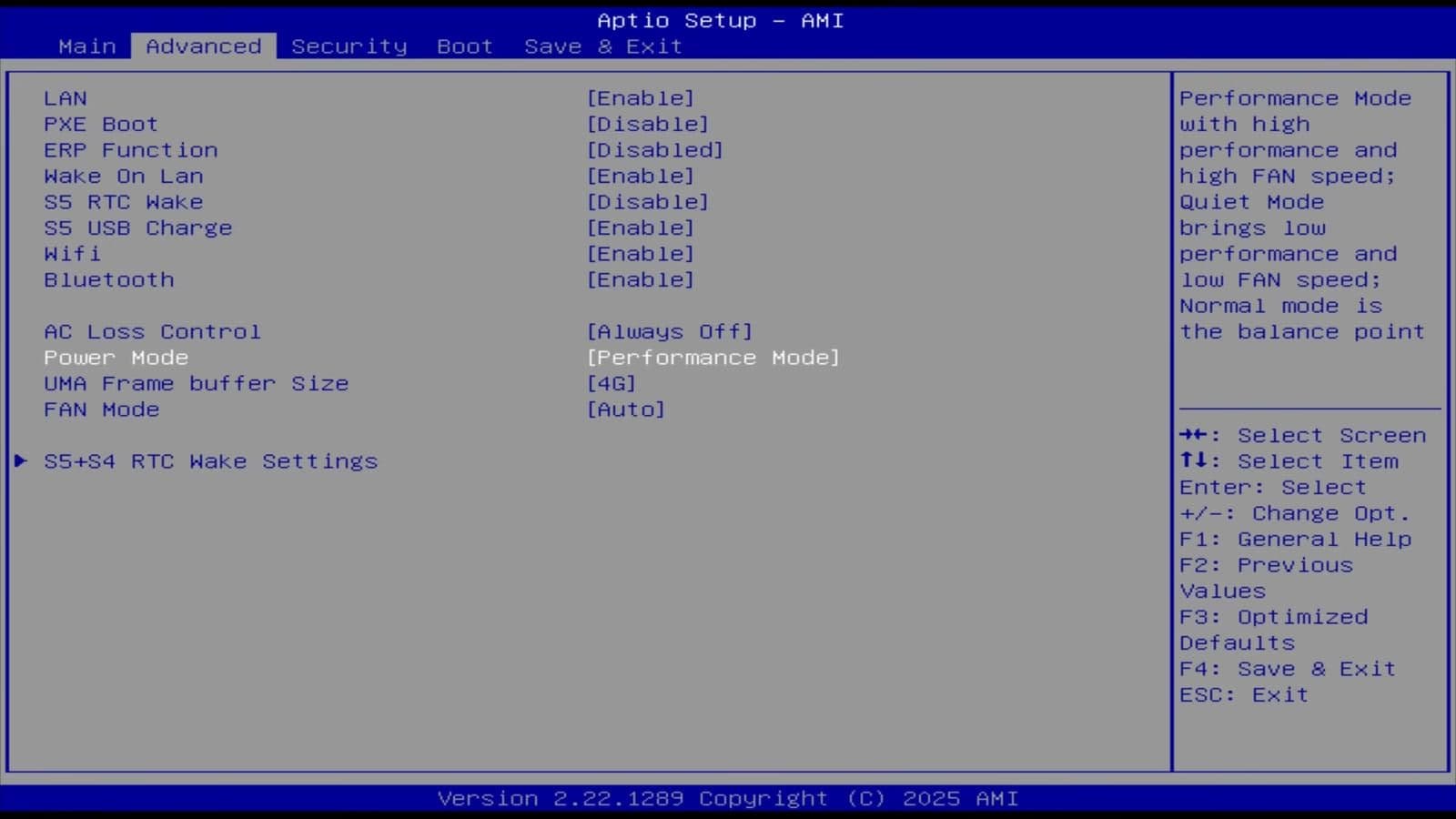
Navigate over to the Advanced tab. By default, the system runs in Normal power mode. Change the Power Mode setting to Performance Mode. This tells the motherboard to allow higher sustained wattage to the Ryzen chip and spins up the fan curve slightly earlier under load.
Right below that, locate the UMA Frame Buffer Size option. The default setting assigns a small portion of system memory to the Radeon 680M graphics chip. Because the A6 comes standard with 32GB of DDR5 RAM, you have plenty of memory to spare. Set that buffer size to 8GB. This reserves 8GB of your system RAM exclusively for the GPU as dedicated video memory. In my testing, these two tweaks smoothed out frame drops and gave a measurable boost in game stability.
Who should buy the GEEKOM A6 and who should skip it
If you need a compact computer for everyday work, photo editing, 1080p video rendering, or casual gaming, the A6 is hard to beat at 400 dollars. It gives you 32GB of RAM, 1TB of fast Gen 4 storage, quad-monitor support, and room to upgrade later. Compare that to the base Apple Mac mini. "A Mac mini starts around $600; you get 8 gigs of RAM with that. This thing? $400, 32 gigs of RAM, and you can actually game on this."
You should skip the A6 if your main goal is playing modern graphics-heavy games on high settings. It cannot match a dedicated gaming desktop with a separate graphics card. You should also skip it if you only check email, browse social media, and stream YouTube videos. Spending $400 on an 8-core Ryzen 7 machine with 32GB of DDR5 RAM is more power and expense than a basic web browsing station requires. For those tasks, a 200-dollar budget PC will do the job just fine.
Frequently asked questions
Can the GEEKOM A6 run modern games at 4K?
It can handle older or well-optimized games like GTA 5 at 4K around 50 to 60 FPS. However, it cannot run demanding modern releases like Cyberpunk 2077 at 4K because it relies on integrated Radeon 680M graphics rather than a dedicated card. For newer titles, you will want to drop the resolution down to 1080p.
How do you upgrade the RAM and SSD on the GEEKOM A6?
You remove the four rubber feet on the bottom of the case and unscrew the four screws beneath them. Carefully lift the metal bottom plate while watching out for the attached Wi-Fi antenna wire. Inside, you will find two DDR5 SODIMM slots supporting up to 64GB of RAM, along with an open secondary M.2 slot for adding extra NVMe storage.
How does the GEEKOM A6 compare to the base Mac mini?
The base Apple Mac mini starts at roughly $600 and comes with 8GB of unified memory that cannot be upgraded. The GEEKOM A6 costs about $419, includes 32GB of DDR5 RAM, a 1TB Gen 4 SSD, and broad game compatibility through Windows 11 Pro. It offers far better hardware value and expansion, though macOS fans may still prefer Apple's software ecosystem.
How do you enable Performance Mode in the GEEKOM A6 BIOS?
Restart your computer and tap the Delete key immediately to enter the Aptio BIOS screen. Use your arrow keys to go to the Advanced tab, find Power Mode, and switch it from Normal to Performance Mode. In the same menu, you can also raise the UMA Frame Buffer Size up to 8GB to give the integrated GPU more memory before pressing F4 to save and exit.